Home | About | Services | Contact Lisa Libutti| Join us on Facebook

October 20, 2010

Grow your Fans via Facebook Ads

18 Super Easy, Highly Effective Tips to Grow your Fans via Facebook Ads

Unless you have a large existing fan base or newsletter base, the best way to grow your fans is via Facebook Ads coupled with a promotion (e.g. contest or coupon). In fact, the #1 way that Facebook users find out about fan pages is via Facebook advertising so it is extremely important to your overall social media success that you know how to run Facebook ads effectively. Simple things like the image you choose or the title you use can make the difference between success and failure when it comes to advertising. We’ve compiled a list of practical, easy-to-implement and highly effective tips to help you maximize the performance of your Facebook ads.

What  Images Should You Use?

Tip #1: Ads with people, and especially close ups of faces and eyes tend to get a higher click through rate. In other words, give your ad a human touch!

Tip #2:  However, don’t use an image of a person if this doesn’t fit with what you’re promoting – ads with an image that’s relevant to your advertisement tend to be most successful.

Tip #3: It’s best to upload horizontal (landscape) images to ensure you’re maximizing the space available, which is 110×80 pixels.


Tip #4: Include branding in your image. Only a tiny percentage of people exposed to your ad will actually click on it but lots will see it so it’s important that you maximize your branding. The great thing is that you can opt to ‘pay-per-click’ for your Facebook advertising so if someone learns about your brand by looking at your ad but doesn’t click, you just got brand exposure for free!

Tip #5: Scale your image as large as possible. Meaning, zoom into your image so that it extends as close to the edge on all 4 sides as possible without losing the sharpness of the image. For example, an image that contains one close up of a face will be more appealing than one that contains full body shots of multiple people, all of whom will appear so small in the photo that you wont be able to see any details.


Tip #6: Another trick you can try after your image has been created is take a large step away from your monitor and see if you can still make out what the image is from far away—if you can’t tell, the image isn’t as clear as it could be for a good ad.

Tip #7: Eliminate unnecessary surroundings around your main image, either by giving it a transparent background or a white one. You don’t want to distract people from what you want them to notice.


Tip #8:  Use colors in your image that contrast with Facebook’s shades of blue— they command more attention and stand out from the rest of the website.
Tip #9: Be creative! You want your ad to stand out from the millions of other ads your audience is exposed to every day.

What Title Should You Use?

Tip #10:  Ask questions. People who read questions to themselves are often sub-consciously answering them also. If your question is compelling enough, they will want to click through to see the answer.

Tip #11:  Limit titles to one line.

Tip #12:  Try titles that will elicit some kind of reaction from your audience, like making them laugh.

What Text Body Should I Use?

Tip #13: Be clear with your message – what are you offering and why should a user care?
Tip #14: Give a compelling reason to click: access to promotions (deals, coupons, sweepstakes, contests, giveaways) is the number one reason people become fans.

Tip #15
: If you’re targeting users based on certain “Likes & Interests” or demographic information, tie that information into your copy. For example, an ad targeting users living in Palo Alto, CA, can fare better if the words “Palo Alto” or “Bay Area” were in the copy, making the ad appear more relevant to the viewer seeing it.

Tip #16: Ask people to like your brand— telling your audience exactly what you want them to do is a surprisingly effective methods of getting users to do what you requested. For example, “Fall is here and so is our seasonal pumpkin cupcake. Click ‘like’ if you think this sounds delicious!”


Tip #17
: Don’t forget a call-to-action! Try messages like “Click here!” or “Enter now!” to let users know exactly what they’re supposed to do within the interaction.


Tip #18:  Try not to sound like a large corporation in your body message. Speak to your audience like people.

To view the original article on Wildfire - click here.


Bookmark and Share

Labels: , , ,

August 4, 2010

Move Your Facebook Fans to Action!

Perhaps you have a Facebook Fan Page and even some fans.  But now what?  How can you encourage your fans to act and interact?

Just like the “Field of Dreams” – if you build a fantastic fan page with plenty of quality content, will they come and will they stay?

They will come and they will stay if you give your fans good reason to engage.

Facebook fan page engagement


Given that over half of Facebook’s 400 million active users log in daily and spend an average of 55 minutes per day on the site, you can get your target audience to spend some of that time getting to know you, your brand, your products and services.

The secret is to create a fan page with the right blend of ingredients that resonates most with your ideal fans. And to ensure they’re made to feel a strong part of your online community.

As mentioned in Part 1, I’ve found there are essentially two components to Facebook fan page engagement: 1) Sharing quality, relevant content and 2) inciting comments. So, here in Part 2, we’ll talk about just how vital comments (and likes, wall posts and @ tags) are to the success of your fan page.
Now that you have a wide variety of regular, quality, relevant content posting on your fan page, here are some ways to get your fans to interact:

1. Ask questions

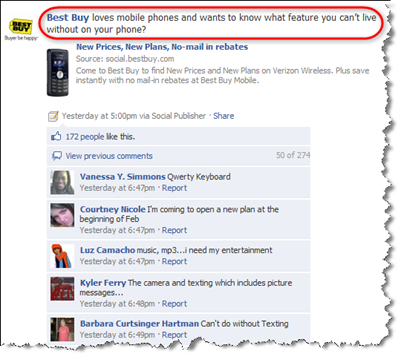
For status updates, try ending with a question. In the example below, Best Buy generated 274 responses so far to their question about what feature your can’t live without on your phone.

Best Buy on Facebook

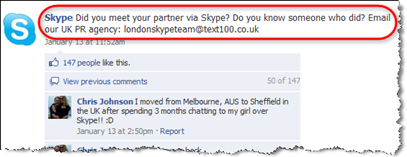
And, in this example, Skype got 147 comments to their question about meeting your partner via Skype!

Skype on Facebook

2. Use the words “you” or “your”

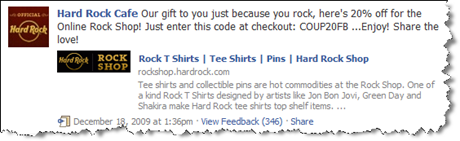
Use the word “you” often – “What are your thoughts?” “What do you think about xyz?” Here, the Hard Rock Cafe is giving out a coupon code with the words “Our gift to you because you rock…”

Hard Rock Cafe on Facebook

3. Keep it short

The easier it is for your fans to read, the more likely they are to respond. Keep your status updates short and simple with one topic. You have up to 420 characters per update, but I recommend about half that for an ideal size. For longer updates, use the Notes app – or write a blog post and update.

4. Post in high-traffic windows

Get to know when your fans are most responsive. Depending on in which part of the world the majority of your fans are, you might want to post between 9:00am and 2:00pm in your timezone.

5. Respond promptly

Do your best to respond to fan questions (as wall posts) as promptly as possible. If you find you can’t keep up with the volume of questions, offer a free teleseminar or webinar where you answer the top questions for your fans. You can do this in the traditional way of having people opt-in to get the phone number so you’ll build your email list at the same time.

6. Address fans by name

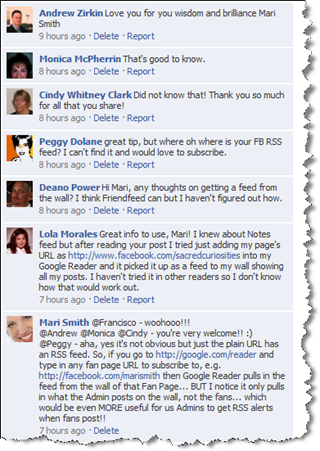
Come back and reply often to your fans’ comments – Facebook currently doesn’t have threaded commenting, so I suggest addressing specific fans in your comments as @name. See my comment at the bottom of the screenshot below:

Facebook comments

7. Comment yourself

Add your own comment as needed to get the ball rolling. However, don’t step in too soon. I often find that the comments come more freely when you allow your fans to run by themselves initially.

8. Thank your fans

Acknowledge your fans often with simple thanks. Genuine recognition goes a *long* way!

9. Surprise your fans

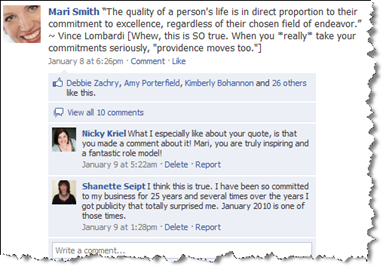
Don’t be afraid to stray “off topic” from time to time and surprise your fans. In other words, your content doesn’t always have to be directly related to your product or service. You might share an inspirational quote and add your own thoughts, for example.


Facebook quote

If you happen to know a fan’s Twitter ID, send a tweet thanking her/him for the comment on your fan page. With a link of course. :)

10. Use @ tagging

You can tag other fan pages that you’re a fan of and your own friends (along with Groups you belong to and Events you’ve RSVPed for). When appropriate, and used sparingly, @ tags can be a very powerful way to have your post show up on others’ walls, which gives you more exposure and brings more fans or potential fans back to engage.

11. Use the Discussion Board

Give your fans a place to network with one another. Plus, often fans want to do self-promotion. You can encourage these types of activities on a specific discussion thread. Also, when you first launch your fan page, be sure to start 3 to 5 discussion topics so it’s not a blank  tab.

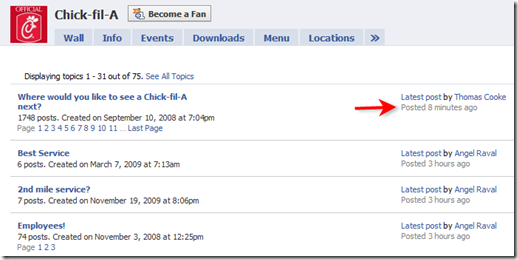
In this example, the most popular discussion thread on Chick-fil-A’s fan page is asking their fans where they’d most like to see a Chick-fil-A next. Topics are always listed in order of the most recently commented on.
Chick-fil-A on Facebook

12. Send updates to fans

Each tab on your fan page and each discussion thread topic has its own unique URL. To bring fans back to your page to contribute to a discussion and get them more engaged, send out an update with a call to action and specific link. (To find the Update feature, click Edit Page under your image then look for Send Update to Fans on the right of your Admin page.)

13. Monitor insights

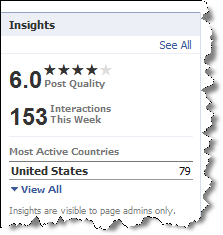
If you’re a perfectionist, the goal is to get 5 stars and a perfect 10 score! Facebook uses algorithms to calculate your Post Quality as determined by the percentage of your fans who engage when you post content, calculated on a rolling seven-day basis. The number of stars depends on how your Post Quality compares to similar pages (for example, pages that have a similar number of fans).

Facebook Insights

The more activity your fan page posts generate, the longer you’ll show up in the News Feed of your fans!

As you build up your fan base, consistently add quality, relevant content and engage your fans. You’ll start to see results that translate into an increase in brand awareness and positive brand sentiment, email and blog subscribers, and of course, sales and paying customers.


Original Article Published at SocialMedia Examiner


Bookmark and Share

Labels: , , ,

July 15, 2010

How To Select All Friends in Facebook

When you are trying to invite your friends to your page, it can be tedious. So here's a quick javascript to select all your friends in Facebook so you can invite them all in one quick motion.

javascript:elms=document.getElementById('friends').getElementsByTagName('li');for(var fid in elms){if(typeof elms[fid] === 'object'){fs.click(elms[fid]);}}

Simply copy and paste that into the address bar when you have the friend selector window open. I have a video to show you exactly what I mean here:


So now you know how to select all friends on Facebook for an event, the easy way. You can use it to invite friends to your Facebook groups, pages, anywhere the friend picker window shows up!

Original Article by Tim Linden


Bookmark and Share

Labels: , ,

June 2, 2010

Tips on Building Up Your Facebook ‘fan’ base,

Many businesses are rushing to build up their Facebook ‘fan’ base, but what’s the value of a fan if you don’t know how to effectively message them and get their attention? Below are a series of very simple tips for how to get your Fan page status updates noticed.

But first, you might be wondering why such tips are even necessary. Aren’t all status updates seen by fans? The short answer is, no. Facebook uses an algorithm to determine which updates and stories will appear in a given person’s newsfeed. While no one knows exactly what this algorythm is (besides Mark Zuckerberg!), it largely depends on how much engagement a particular story receives. So, if you send an update out to your fans and it receives a lot of ‘Likes’ or ‘Comments’, it will be exposed to a much higher % of your fans in their Top News stream and there will therefore be a much higher likelihood that your fans will actually see your post than an update that gets few ‘Likes’ or ‘Comments’. So sending out posts that are highly engaging is extremely important to the success of your Facebook marketing strategy.

TRICK #1: Ask fans to ‘Like’ your update!
This may sound trivial, but it is hugely powerful – when you post an update out to your fans ask them to show their support by clicking on the ‘Like’ button of your post. For example, if you send an update about a new product feature instead of simply saying: “We’re excited to announce the release of our brand new navigation, ” say something like: “We’re excited to announce the release of our brand new navigation. Click the ‘Like’ button if you like this change”. We have tried this over and over again and on average we see 200-300% more ‘Likes’ when we make direct requests like this.


Check out the great engagement with this post-- 29 people indicated they "Like" it, which was likely aided by the direct prompt to do so right in the message!

TRICK #2: Encourage comments by asking yes/no questions
A powerful way to encourage comments is to ask your fans questions when you post an update. But you’ll get a much higher response rate if you ask questions that require very little effort to answer, like yes/no questions. For example, you’ll get far fewer comments if you ask “Tell us what you think of our new homepage design” than if you ask “Do you like our new homepage design – yes or no?”. Of course, if you’re looking for concrete feedback from your fans you may prefer the first approach, but if you are wanting maximum exposure for your post the latter approach will yield a significantly higher number of comments.

TRICK #3: Don’t use the Facebook links box!
You may have noticed that Facebook provides an option to attach a link to your fan page status updates. What you may not know is that you’ll generally get fewer clicks on your link if you use this feature rather than simply including a link in the body of your update.

Don’t do this…


The link button outlined above will attach a link to your post, but its best to avoid using this tool, and just paste the link right into your text.

Try this instead…


Pasting a link you wish to share with your users directly into your message has proven, with testing, to have a significantly higher user click rate!
TRICK #4: If you post your own videos, do use the Facebook video upload
Just as Facebook provides functionality to attach a link to your update, so too does it allow to you attach a video to your post. While we recommend against using this functionality when posting a link, we do recommend that you use the ‘attach‘ functionality to add your own videos to your updates. Why? If you upload your video via the Facebook ‘attach’ functionality it will automatically embed a ‘Like’ button into your video, thus giving you the opportunity to build your fans when people share your video. If you simply link to a video on YouTube or elsewhere there will be no ‘Like’ button automatically embedded in your video.

Try this out…


Upload videos which you have on your computer using this uploader tool– it automatically inserts a “Like” button right into your video!

You get a cool feature with it!


By uploading this video directly into the video uploader tool pictured above, users can now click directly on “Like” within the video as they watch.
TRICK #5: Target your messages to different segments of your audience.
Did you know that you can push out status updates that only specific segments of your fan base will see? For example, if you have a global business and you have an offer that is only relevant to your Canadian customers, you could push out a story that only your Canadian fans will see. Likewise, if you have Spanish speaking fans you could target them exclusively with an update written in Spanish. Right next to the “Share” button in the messaging box is a targeting tool-- while the default targeting is “Everyone,” you can limit the outreach by location, all the way down to city/state and by language.

If you have a message that you don’t need or want all of your users to see, you can customize who the message will be revealed to, by using the functionality built right in to the message box!

Target your message right down to the city!


You can target you messages by location of your users, as deep as their city, and even the language they speak!
TRICK #6: Make it worth your fan’s while to look out for your updates!
Razorfish published a study awhile ago that asked consumers why they fan and follow brands. The greatest percentage of people, by far, responded ‘for the exclusive deals & offers’. So if you want your fans to watch out for and look forward to receiving your updates, you should reward them from time to time with special offers like coupons, giveaways, contests and more. We’ve seen companies that offer regular deals (e.g. Friday specials or Tuesday giveaways) build highly engaged fan bases.


Original article posted on Wildfire Social Media Blog


Bookmark and Share

Labels: , , ,